
MEFISTO
Industrial Operations & Invoicing Platform
A centralized platform designed to support complex operational workflows and enable efficient management of structured business data

PROJECT OVERVIEW
As part of the company’s digital transformation, a new internal system was developed to replace a legacy invoicing tool.
The goal was to support industrial operations by integrating production and logistics processes into a unified platform.
Role
Lead Product Designer
Year
2018-2021
Project type
B2B SaaS (Internal Enterprise Tool)

.png)

.png)


PSA GROUP INTRODUCTION
PSA is a leading global automotive manufacturer, operating across international markets with complex systems spanning production, logistics, and financial management.


PROBLEMS IN THE LEGACY SYSTEM
Users faced challenges navigating complex data and completing key invoicing operations efficiently
01
Fragmented & Unreliable System
The legacy system was unstable and prone to bugs, which affected critical workflows such as invoice validation and data processing.
02
Lack of Data Transparency
The system lacked clear visibility into how data was processed, making it difficult for users to understand pricing calculations, validation rules, and system states.
03
Poor Localization & Configuration
Inconsistent translations and lack of centralized configuration made content difficult to manage and maintain, design lacks of clarity.
04
Inefficient Data Interaction
Users struggled to efficiently search, filter, and navigate large volumes of data, making daily operations time-consuming and error-prone.
OLD SYSTEM SHOWCASE 1
Misaligned with the corporate brand
reducing perceived consistency and professionalism.


OLD SYSTEM SHOWCASE 2
Dense and unstructured layouts made key information difficult to scan and prioritize.
DESIGN CHALLENGES
Balancing complexity, system constraints, and evolving business needs

Complex and evolving business logic
complex industrial workflows that were not fully defined at the start and evolved continuously over time.

Data-heavy & multi-system Integration
The platform relied on data from multiple systems, requiring the design to support high data density and complex relationships.

Balancing usability with constraints
Limited development resources required prioritizing core functionality and usability over visual refinement.

Multi-role and permission complexity
Different user roles with varying permissions introduced complexity in interface behavior and access to features.

Scalability of the visual system
The system needed to scale from invoicing to additional operational modules, requiring a flexible design approach.
WORK METHODOLOGY
Combining MVP strategy, iterative design, and agile delivery to manage complexity and evolving requirements
Due to the scale and complexity of the system, we adopted an agile approach, breaking the product into iterative sprints to deliver a functional MVP early.
This enabled continuous expansion of features while allowing users to gradually transition from the legacy system to the new platform.

MVP was essential to manage the system’s complexity, allowing core workflows to be delivered early while progressively refining business logic and expanding features.

DESIGN APPROCHE
Use double diamond to explore and define complex business problems, helping structure the understanding of workflows, data, and user needs

System Understanding and Key Workflow
A structured workflow that converts operational events into validated invoicing outputs
The platform converts industrial operational data into validated invoices through a multi-step workflow involving pricing, rule checks, and document generation, the flow is like:
Operational Data → Valuation → Validation → Invoice → Transfer
The platform converts industrial operational data into validated invoices through a multi-step workflow involving pricing, rule checks, and document generation, the flow is like:
Source data
Operational data enters the internal system
Transfer price
Internal pricing between business entities is determined
Valutation
Pricing, rules, and validations are applied
Industril invoice
Final invoices are generated and recorded
Tracking
Invoices are monitored, updated, and archived

The platform converts industrial operational data into validated invoices through a multi-step workflow involving pricing, rule checks, and document generation, the flow is like:
%20(2).png)
USER UNDERSTANDING AND USER RESREARCH
Research focused on operational roles, daily workflows, and recurring pain points in the legacy system
"Every day, I spend a lot of time switching back and forth between several different software programs. Some of them are really hard to use—the text is tiny, the translations are inaccurate, and what’s even more troublesome is that it’s difficult to automatically import and align data across different programs."

After communicating with users and conducting research, I have gained a better understanding of their needs and pain points. This approach ensures that the design is more effective and targeted, allowing users to quickly get the hang of our product.

QUALITATIVE INPUTS
-
Stakeholder workshops
-
User interviews
-
Shadowing daily tasks
-
Reviewing support issues
-
Observing legacy workflows

KEY FINDINGS
-
Users handled repetitive high-volume tasks
-
Data accuracy was critical
-
System feedback was unclear
-
Search & filtering were inefficient
-
Different roles needed different levels
Roles | Main modules | Core tasks | Key needs | UX focus |
|---|---|---|---|---|
Manager | Search, Source Invoice, Tracking | Process daily records, monitor status | Speed, clarity | Fast navigation |
System Administrator | Valuation, Invoice, Export | Validate amounts, issue invoices | Accuracy, traceability | Clear data review |
Operations Coordinator | Invoicing, Pricing, Tracking, Reports | Manage local billing, monitor market activity, coordinate with HQ | Flexibility, visibility | Local adaptation |
Finance Specialist | Permissions, Translation, Settings | Manage users, maintain configuration | Control, efficiency | Scalable admin tools |
Filiale / Local Entity | Dashboard, Reports | Monitor KPIs, approvals | Visibility | Summary & insights |
DESIGN SHOWCASE
The following design solutions were shaped by user research, workflow analysis, and a deep understanding of system complexity

LOGO AND VISUAL REDESIGN
Users faced challenges navigating complex data and completing key invoicing operations efficiently
I used the letter M as the main creative point in the design, MEFISTO is an invoicing system, so I merged the invoice element into the letter, in using the shape of three invoices to form the letter M.

CREATION OF DESIGN SYSTEM
A unified design system was created to ensure consistency, scalability, and efficiency across a growing enterprise platform
01. COLOUR
PRIMARY COLORS:
SECONDRARY COLORS:
Palette grey
Palette blue
Hight-light colors
Background, table
02. TYPE-FACE
FONT-FAMILY: 'HELVETICA', 'LATO' :
Helvetica Regular
Lato Bold
Lato Regular
03. ICONS
These icons are specifically designed for MEFISTO system, they will be used in different situation. All icons MEFSTO design based on grid, the standard size is 24x24.


By leveraging visual cues, users can quickly identify functionalities and take precise actions without relying on textual explanations.
MAIN MODULES ICONS:
Small icons in the product
ICON LIST:
04. LAYOUT UTILITIES
The arrange component is a utility for laying out elements side by side. Elements can either be only wide enough to contain its content or they can take up the remaining space in the row

05. OTHER ELEMENTS IN THE DESIGN SYSTEM
Standardized components and guidelines, paired with corresponding code, create a shared language between design and development for efficient implementation.


LEARN MORE ABOUT MEFISTO DESIGN SYSTEM
The Mefisto design system includes all visual elements and corresponding code for the product, ensuring that the product can continue to evolve within a standardized visual framework. This guarantees the project’s smooth operation even if the development team changes.
DESIGN CREATION SHOWCASE
A curated selection of key interfaces, highlighting visual consistency, usability, and product thinking
EFFICIENCY AND FRIENDLY
Reduce friction in high-frequency operational tasks.
CLARITY THROUGH STRUCTURE
Organize dense information into scannable layouts.
ACCURACY AND VALIDATION
Prevent errors through clear rule-based validation.
ROLE-BASED CONTROL DESIGN
Adapt interfaces and permissions to different user responsibilities.
SCALABLE FOUNDATIONS DESIGN
Build modular patterns that support future modules and growth.
Log in to the product
Search result
Consultation
Event journal
Functional pages
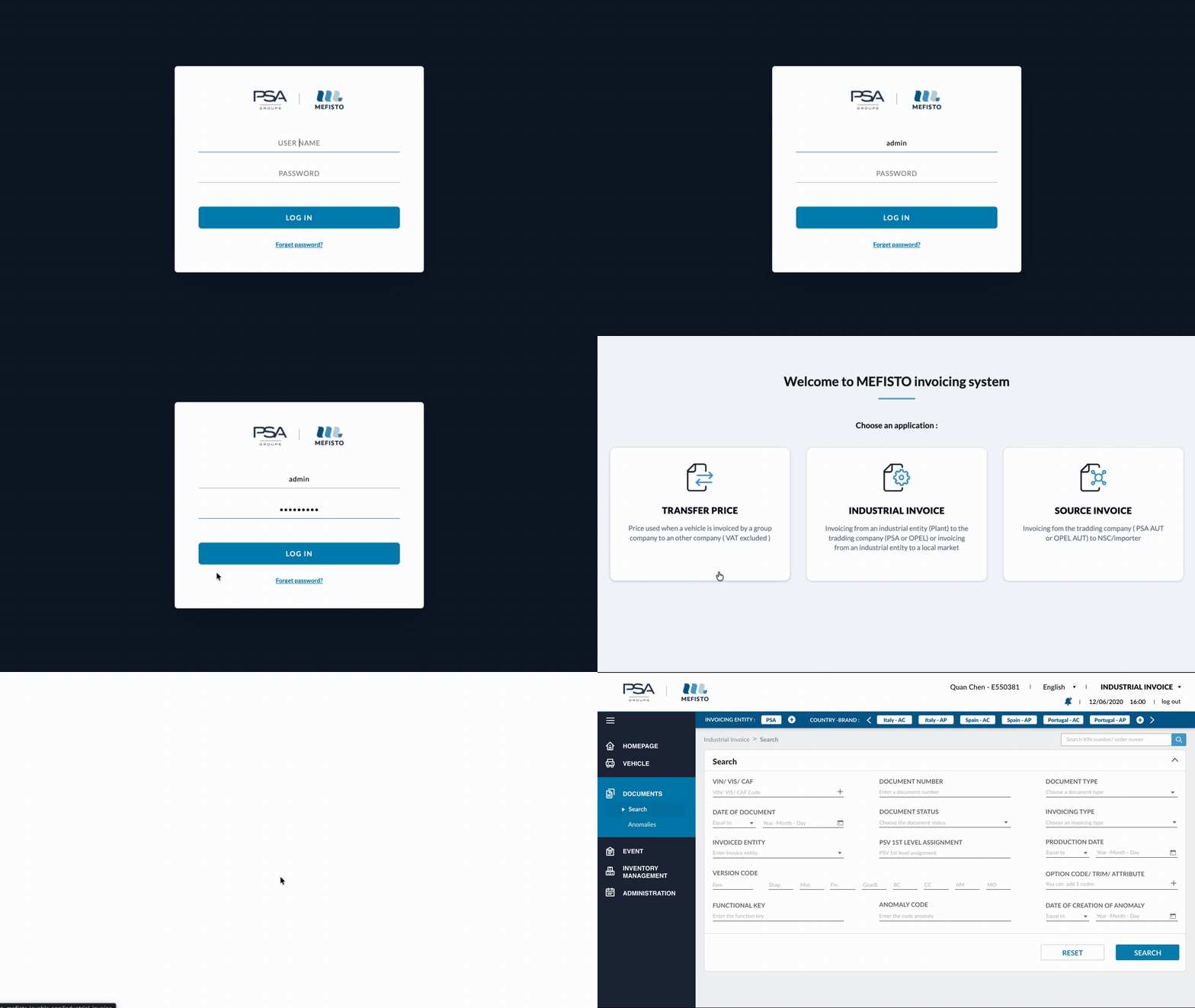
ENTRY FLOW AND NAVIGATION
From login to module selection and search interface, this flow highlights how users quickly reach key functionalities.
FLEXIBLE LAYOUT AND FOCUSED EXPERIENCE
The collapsible menu on the left provides users with more space to work, while the clear icons are easy to understand, reducing the likelihood of user errors.


CONTEXTUAL NOTIFICATION PANEL
A slide-in panel that surfaces critical alerts and system messages, enabling users to quickly identify issues and take action without disrupting their workflow.
STRUCTURED SEARCH EXPERIENCE
A cohesive set of components designed to improve clarity, maintain visual consistency, and support accurate data filtering

Log in to the product
Result of search
Consultation
Event journal
Functional pages
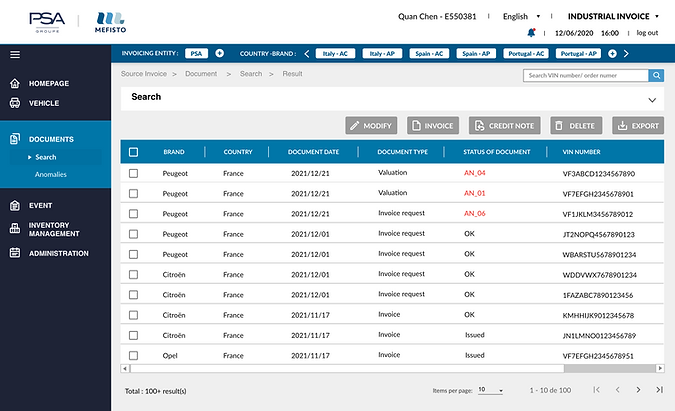
ENTRY FLOW AND NAVIGATION
A clean and structured layout ensures clear information hierarchy, while role-based interactions adapt to user needs for efficient data exploration.

Optimized for scanning, alignment, and role-based usability

Designed to minimize cognitive load and enhance data clarity
Log in to the product
Result of search
Consultation page
Event journal
Functional pages
CONSULTATION OF THE INVOICE
A usability-driven interface designed to enhance readability, accessibility, and efficiency, enabling users to confidently review and manage invoice data.
Clear & Structured Consultation
A clean layout that highlights key information through structured grouping, combined with a readable table to support efficient data exploration.

Anomaly Detection & Visualization
A structured and color-coded system highlights anomalies by type and severity, enabling users to quickly identify critical issues and take action.

Controlled Data Editing Experience
A structured interface that enables precise data modification, allowing users to correct issues or bypass non-blocking anomalies.

REFINED INTERACTIONS
Bypasse anomalies
Allows users to skip non-blocking issues directly from the top bar, ensuring a smooth and uninterrupted workflow

Informative Status Indicators
Key data points are marked with icons to indicate status or dependencies, allowing users to access detailed information


Log in to the product
Result of search
Consultation
Event journal
Functional pages
EVENT JOURNAL TRACKING
The event journal provides a transparent history of user actions and system events, enabling traceability, accountability, and efficient issue resolution.


INTELLIGENT LOG FILTERING
Users can quickly filter and extract relevant events using keywords, enabling precise tracking and efficient issue investigation in event journey page.

Log in to the product
Result of search
Consultation
Event journal
Functional pages
FUNCTIONAL ADMINISTRATION
A flexible interface that allows users to edit data directly or perform bulk updates via Excel, ensuring efficiency and scalability.

STRUCTURED VEHICLE SEARCH
A clear and categorized layout helps users efficiently navigate across different types of vehicle-related information.

EVENT INTEGRATION OVERVIEW
Provides a structured view of event-related data, showing the distribution of information across different applications and categories.


APPLICATION LIFECYCLE MANAGEMENT
Visibility and control across each stage of the developement process, from design integration to validation and completion

This process ensures consistency between design intent and final implementation
01
DEFINE REQUIREMENTS
Needs and design are documented and structured
02
DESIGN SPECIFICATION
Detailed design descriptions are added for guidance
03
DEVELOPMENT TRACKING
Progress and execution are monitored through ALM
04
VALIDATION & TESTING
The final output is reviewed to ensure consistency
EVENT JOURNAL TRACKING
The event journal provides a transparent history of user actions and system events, enabling traceability, accountability, and efficient issue resolution.


DEVELOPMENT TRACKING
Stay up to date on development progress in ALM at all times to ensure that projects run smoothly and on schedule, while also raising issues and tracking updates in a timely manner.

IMPACT AND OUTCOMES
Key improvement in efficiency, data visibility, and workflow clarity achieved through the redesigned system
17
Different version delivered
Update the version based on functionality and MVP
+25%
Improvement of work efficiency
Better task clarity and more intuitive workflow navigation
-20%
time takes users to complete tasks
Reduce usability barriers and improve user-friendliness
90/100
Users' satisfaction rate
Based on survey and interview scores
